Problem Statement
Imagine it's 2 AM and your on-call pager fires: "Production API latency exceeded SLA — customer-facing orders are failing." You're the SRE on duty. There are no AI agents, no MCP servers, no LLM-assisted tooling. It's you, a terminal, a bunch of dashboards, and a runbook that was last updated six months ago.
Here's what the next few hours actually look like:
The manual troubleshooting gauntlet
-
Triage the alert — Open PagerDuty or OpsGenie, read the alert, try to figure out which cluster, namespace, and service are affected. If the alert is vague ("high latency on ingress"), you're already guessing.
-
Authenticate and get context — Run
az login, set the right subscription, pull kubeconfig for the correct cluster, switch kubectl context. If you manage multiple clusters across environments, this alone can eat 5–10 minutes. -
Check pod and node health —
kubectl get pods -A | grep -v Running,kubectl describe pod <name>,kubectl get events --sort-by=.lastTimestamp. Scroll through walls of YAML and event output looking for the signal in the noise. -
Pull logs —
kubectl logs <pod> --previous, maybe across multiple containers and replicas. If the pod already restarted, the logs may be gone. If you're lucky, they're in Log Analytics — so now you're writing KQL queries in the Azure portal, waiting for results, adjusting time ranges, and filtering namespaces. -
Check metrics — Switch to Azure Monitor or Grafana. Look at CPU, memory, network, and disk for the node pool. Open a separate tab for Managed Prometheus and write PromQL queries. Compare current values to "normal" — which requires you to remember what normal looks like.
-
Correlate across layers — The pod is
CrashLoopBackOff, but is it the app, the node, or something upstream? Check the node's VM status in the portal. Check NSG and UDR rules if there's a networking suspicion. Query Azure Resource Health. Open yet another tab for App Configuration or Key Vault to see if a secret expired. -
Search for known issues — Open internal Confluence or wiki, search for similar symptoms. Check the AKS release notes for known regressions. Google the error message. Read three Stack Overflow threads that don't quite match.
-
Escalate and communicate — If you're stuck after 30–45 minutes, you page the next-tier engineer or the app team. Now you're writing a Slack/Teams summary of everything you've tried, copying log snippets, and hoping the other person can ramp up quickly.
-
Apply a fix and verify — Restart a deployment, scale a node pool, roll back a Helm release, or patch a config. Then wait. Re-run the same log and metric queries to confirm the issue is resolved. Update the incident channel.
-
Write the post-mortem — Document what happened, root cause, timeline, and action items. Manually reconstruct the sequence from browser history, terminal scrollback, and memory.
The real cost
| Typical range | Impact | |
|---|---|---|
| Time to first meaningful data | 10–20 min | The SRE is context-switching across tools before even beginning root cause analysis |
| Time to identify root cause | 30–90 min (simple) / hours (complex) | Every minute of outage is lost revenue, broken SLAs, and eroded customer trust |
| Knowledge dependency | High | The troubleshooting quality varies wildly depending on who's on call — tribal knowledge isn't documented, and not every SRE knows every service |
| Repetitive toil | ~60–70 % of steps are the same across incidents | Scripting and automation help, but scripts are brittle, require maintenance, and don't reason about novel failures |
| SRE burnout | Cumulative | Alert fatigue, 2 AM pages, and repetitive manual correlation take a real toll on retention and morale |
Even well-run teams with solid automation (custom scripts, cron-based health checks, ChatOps bots) still face the same fundamental bottleneck: a human must manually connect the dots across logs, metrics, events, configurations, and institutional knowledge — under time pressure, often at odd hours, with incomplete information.
For the business, every minute counts. A prolonged outage doesn't just cost infrastructure dollars — it costs customer trust, SLA credits, and sometimes regulatory penalties. The gap between "alert fired" and "root cause identified" is where the damage accumulates.
In the rest of this post, we'll explore how an agentic approach — combining LLMs, MCP servers, and purpose-built tools like HolmesGPT, the Agentic CLI for AKS, and Azure SRE Agent — can compress that troubleshooting timeline from hours to minutes, reduce the knowledge barrier, and give SRE teams a co-pilot that reasons across your entire platform.
Solution
Now that we've felt the pain, let's look at the agentic tools and projects that can dramatically improve this workflow. This section introduces five complementary projects that enable AI-powered platform operations. Each tackles a different slice of the troubleshooting problem.
Related Projects
| Project | Description |
|---|---|
| Azure MCP Server | Microsoft's official MCP server for 40+ Azure services. Local or remote deployment. Gives agents the ability to query Azure Monitor, Resource Graph, Storage, Cosmos DB, and more. |
| AKS MCP Server | MCP server specialized for AKS/Kubernetes operations — cluster management, workload diagnostics, real-time eBPF observability via Inspektor Gadget, and multi-cluster Fleet support. |
| HolmesGPT | CNCF Sandbox agentic AI framework for root cause analysis. Integrates with 20+ data sources (Prometheus, Loki, Datadog, MCP servers, etc.) and iteratively refines its hypothesis. |
| Agentic CLI for AKS | Azure CLI extension (az aks agent) powered by the AKS Agent (based on HolmesGPT with AKS-specific enhancements). Natural language troubleshooting from your terminal or in-cluster. |
| Azure SRE Agent | An AI-powered Azure service (preview) that continuously monitors your resources, automatically investigates incidents from Azure Monitor / PagerDuty / ServiceNow, and suggests — or with your approval, executes — remediation actions via a natural-language chat in the Azure portal. |
How They Relate
┌──────────────────────────────────────────────────────────────────────┐
│                      AI-Powered Platforms                            │
├──────────────────────────────────────────────────────────────────────┤
│  Azure MCP Server ► Azure Services (Storage, Cosmos, Monitor...)    │
│       │                                                              │
│       └──────────► Can be used alongside AKS MCP Server              │
│                                                                      │
│  AKS MCP Server ─► Kubernetes + Inspektor Gadget + Fleet             │
│       │                                                              │
│       └──────────► Consumed by HolmesGPT and Agentic CLI            │
│                                                                      │
│  HolmesGPT ──────► Agentic RCA framework (uses MCP servers)         │
│       │                                                              │
│       └──────────► Powers Agentic CLI for AKS                        │
│                                                                      │
│  Agentic CLI for AKS ────► HolmesGPT for Azure-native experience    │
│                                                                      │
│  Azure SRE Agent ─► Portal-based AI agent for Azure resources        │
│       │              (App Service, Container Apps, Cosmos DB, etc.)   │
│       └──────────► Incident management + automated remediation       │
└──────────────────────────────────────────────────────────────────────┘
💡 Quick Start: If you're new to these tools, start with Azure MCP Server for Azure resource management, then explore AKS MCP Server for Kubernetes operations. For troubleshooting, jump to Agentic CLI for AKS, HolmesGPT, or Azure SRE Agent.
Azure MCP Server
Azure MCP Server is Microsoft's official Model Context Protocol implementation that enables AI agents to interact with Azure services through natural language. It provides a standardized interface for AI tools to manage Azure resources, query data, and perform operations across the Azure ecosystem.
📚 Documentation: Azure MCP Server Overview
Supported Interaction Models:
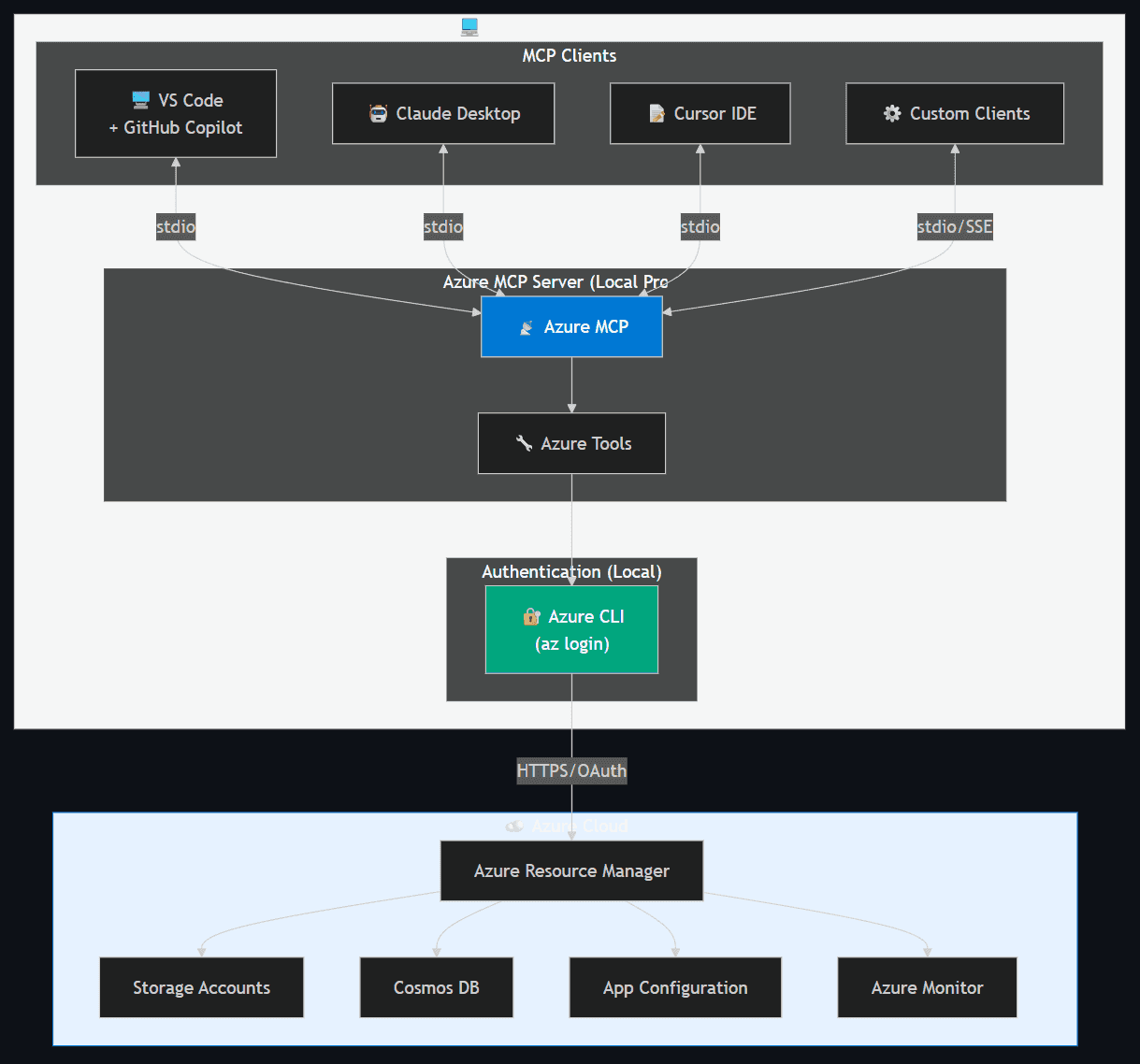
| Client | Transport | Use Case |
|---|---|---|
| VS Code + GitHub Copilot | stdio | Interactive development, resource management |
| Claude Desktop | stdio | Conversational Azure operations |
| Cursor IDE | stdio | AI-assisted Azure development |
| Custom MCP Clients | stdio / SSE | Automation, CI/CD pipelines |
Deployment options:
- Local (default) — Runs as a local process on the developer's workstation, authenticating via
az login. Communication over stdio.
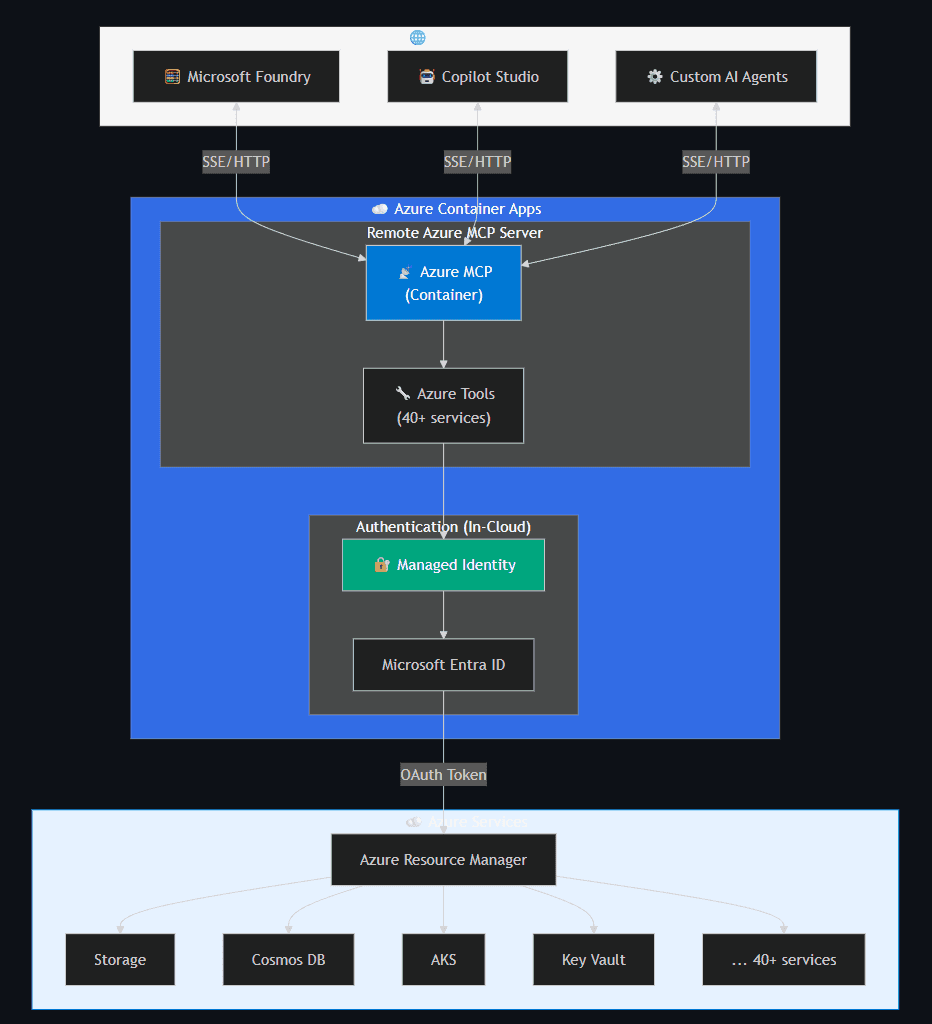
- Remote (preview) — Deployed as a container on Azure Container Apps with Managed Identity. Accessible over HTTP/SSE for use by Microsoft Foundry or custom remote agents.
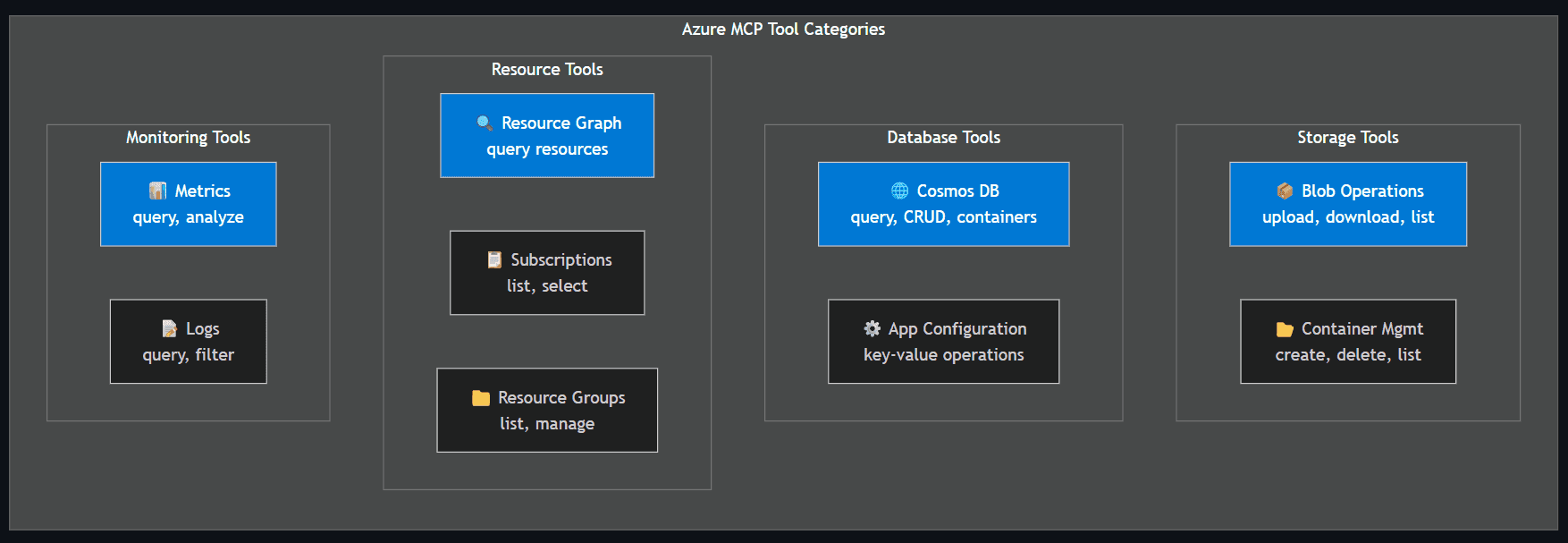
- Tool categories: Storage (blob, container ops), Databases (Cosmos DB, App Configuration), Resource management (Resource Graph, subscriptions, resource groups), and Monitoring (metrics, logs).
AKS MCP Server
AKS MCP Server extends the Model Context Protocol specifically for Azure Kubernetes Service operations. It provides AI agents with deep Kubernetes integration including cluster management, workload operations, real-time observability via Inspektor Gadget, and multi-cluster fleet management.
📚 Resources: AKS MCP Server | GitHub
Deployment options:
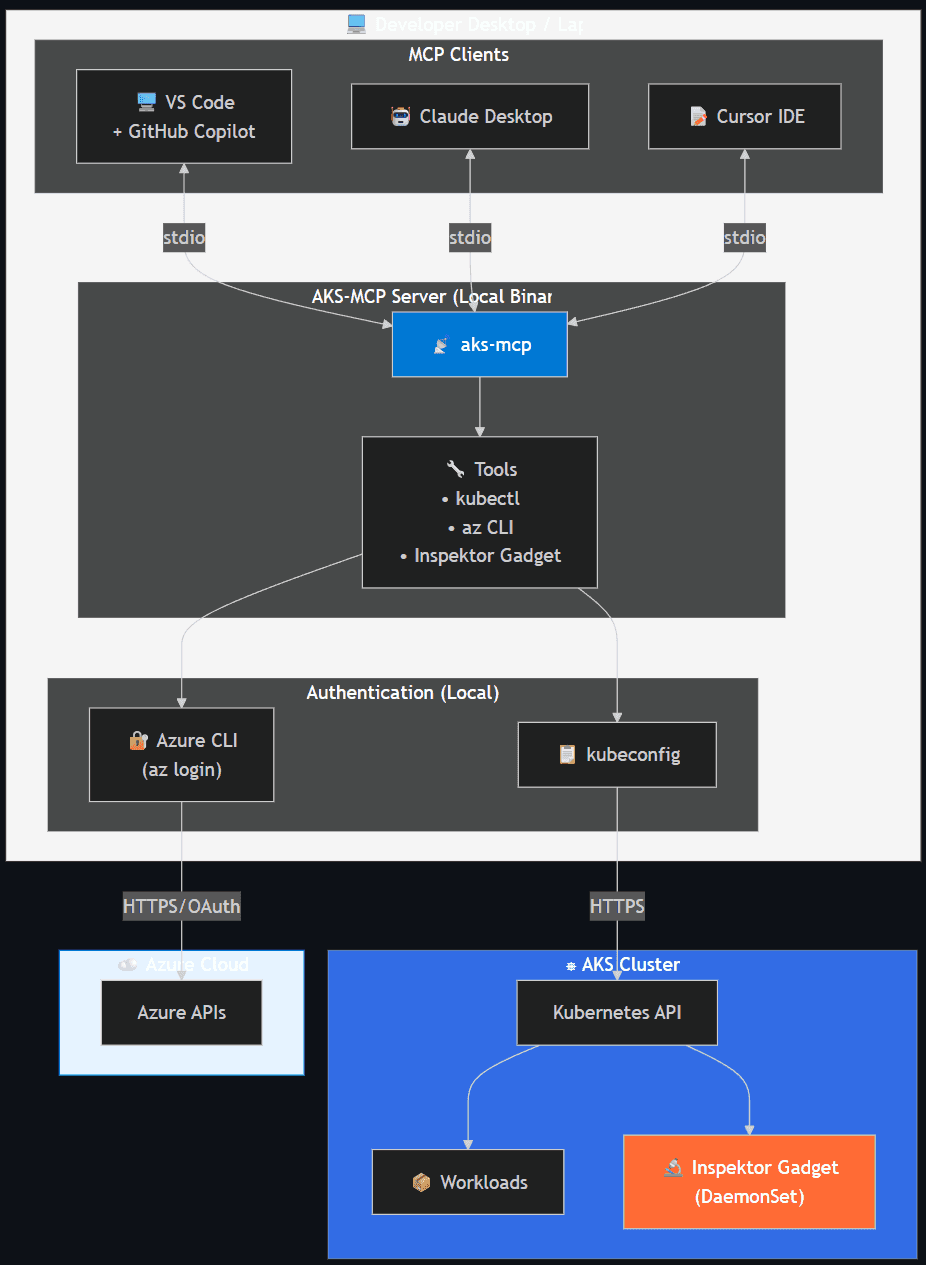
- Local — Runs as a local binary using existing Azure CLI and kubeconfig credentials. Inherits user's Azure RBAC and Kubernetes RBAC.
- Remote (in-cluster) — Deployed via Helm chart for shared access and production diagnostics. Uses Workload Identity and ServiceAccount RBAC.
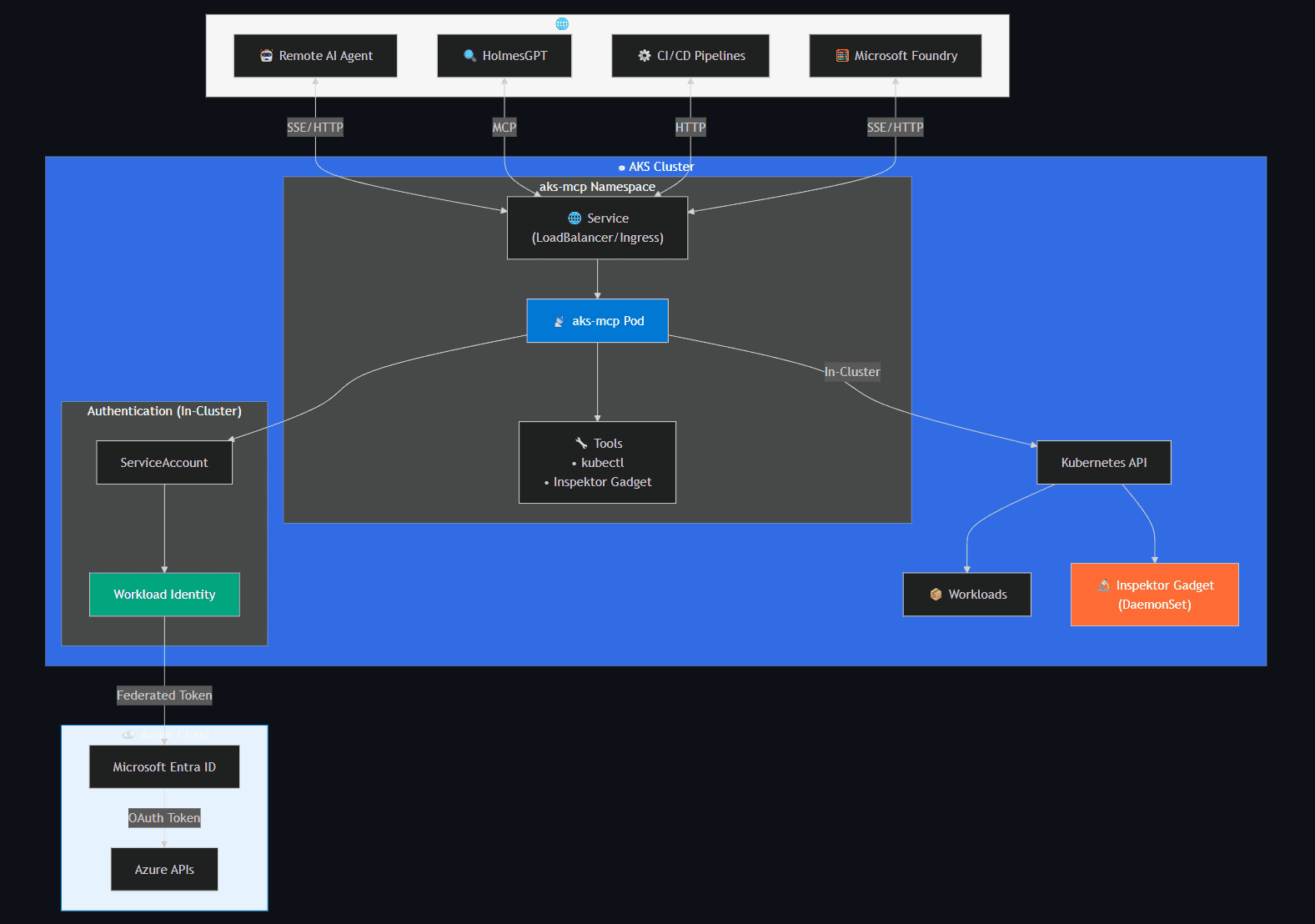
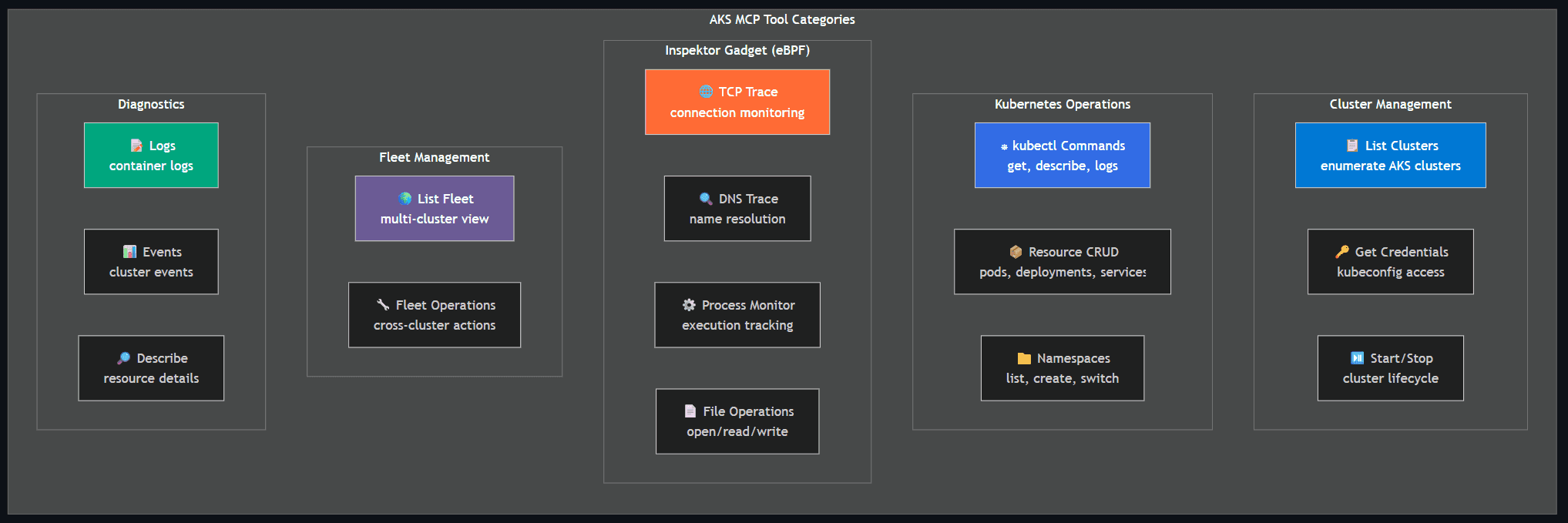
Tool categories: Cluster management (list, credentials, start/stop), Kubernetes operations (kubectl, resource CRUD, namespaces), Inspektor Gadget / eBPF (TCP trace, DNS trace, process monitor, file ops), Fleet management (multi-cluster view and operations), and Diagnostics (logs, events, describe).
HolmesGPT
HolmesGPT is an open-source agentic AI framework (CNCF Sandbox) that performs root cause analysis (RCA), executes diagnostic tools, and synthesizes insights using natural language prompts.
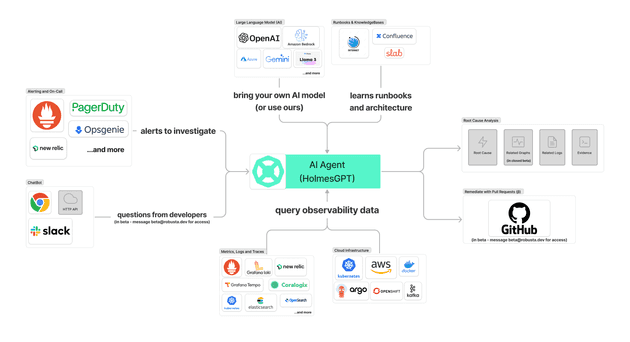
📚 Resources: HolmesGPT Website | GitHub
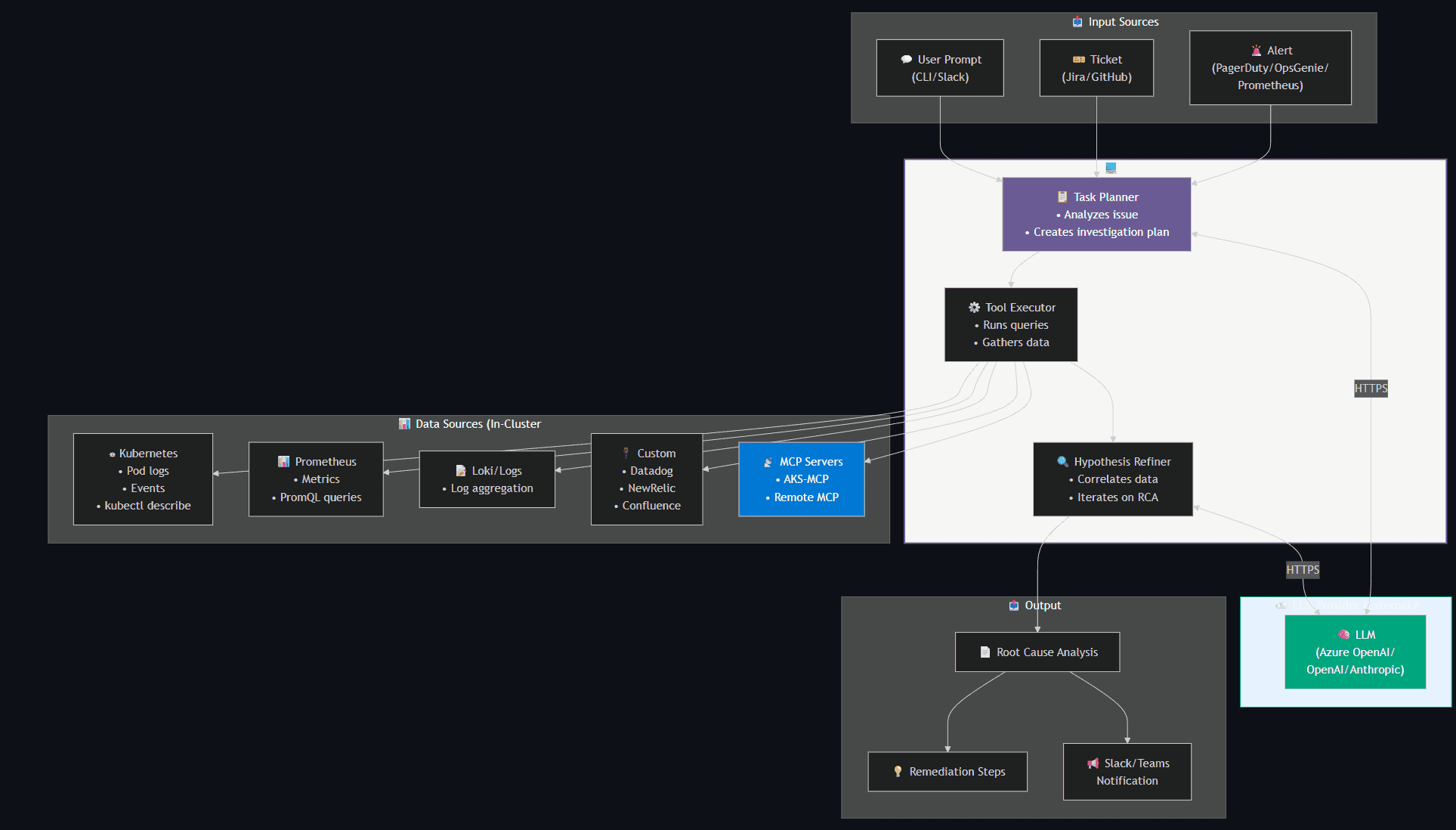
Core capabilities:
- Decides what data to fetch based on the issue
- Runs targeted queries against observability tools
- Iteratively refines its hypothesis using LLM reasoning
- Works with existing runbooks and MCP servers
- Runs locally or remotely (in-cluster)
- Read-only by design — safe for production, respects RBAC permissions
Key features:
| Feature | Description |
|---|---|
| Agentic Loop | Iterative reasoning that refines hypothesis based on new data |
| Extensible Toolsets | 20+ built-in data sources (Kubernetes, Prometheus, Loki, Datadog, etc.) |
| MCP Integration | Native support for remote MCP servers |
| CNCF Sandbox | Donated by Robusta.dev; Microsoft AKS team is co-maintainer |
Who benefits:
- Cluster Operator — Faster incident response, reduced MTTR
- Application Developer — Self-service troubleshooting without deep K8s expertise
Agentic CLI for AKS
The Agentic CLI for AKS (az aks agent) brings agentic AI capabilities directly into the Azure CLI, powered by the AKS Agent (based on HolmesGPT with AKS-specific enhancements). It enables natural language troubleshooting of AKS clusters.
Building Blocks
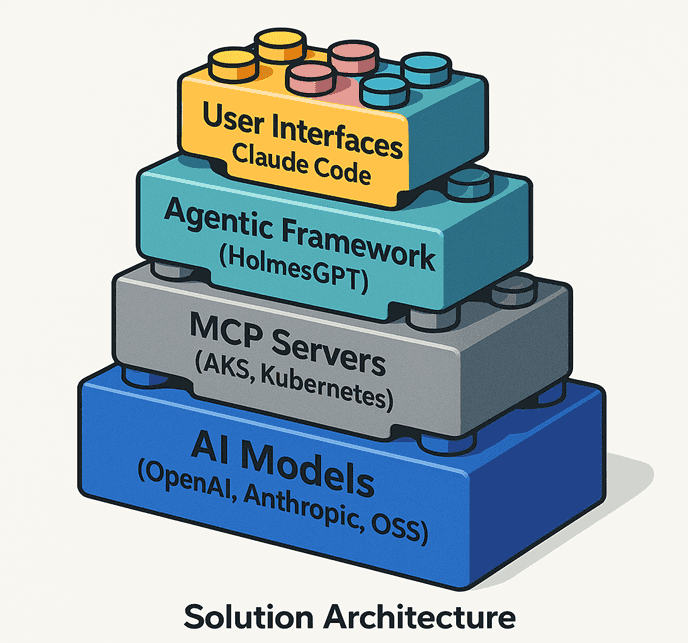
Source: AKS Blog
📚 Resources: Agentic CLI Overview
The AKS-MCP server acts as a universal, protocol-first bridge between AI agents and AKS. It combines:
| Capability | Description |
|---|---|
| Azure SDK Integration | Direct calls to Azure/AKS APIs |
| Kubernetes Operations | kubectl commands and resource management |
| Real-time Observability | Inspektor Gadget (eBPF-based) tracing |
| Fleet Management | Multi-cluster operations at scale |
Deployment modes:
| Mode | Where it Runs | Image Source | Best For |
|---|---|---|---|
| Client Mode | Local (Docker) | Docker Hub | Quick troubleshooting, development |
| Cluster Mode | In-cluster pod | Microsoft Container Registry | Production, shared access, persistent agent |
Client Mode
Runs locally in a Docker container, inheriting the user's Azure and Kubernetes permissions.
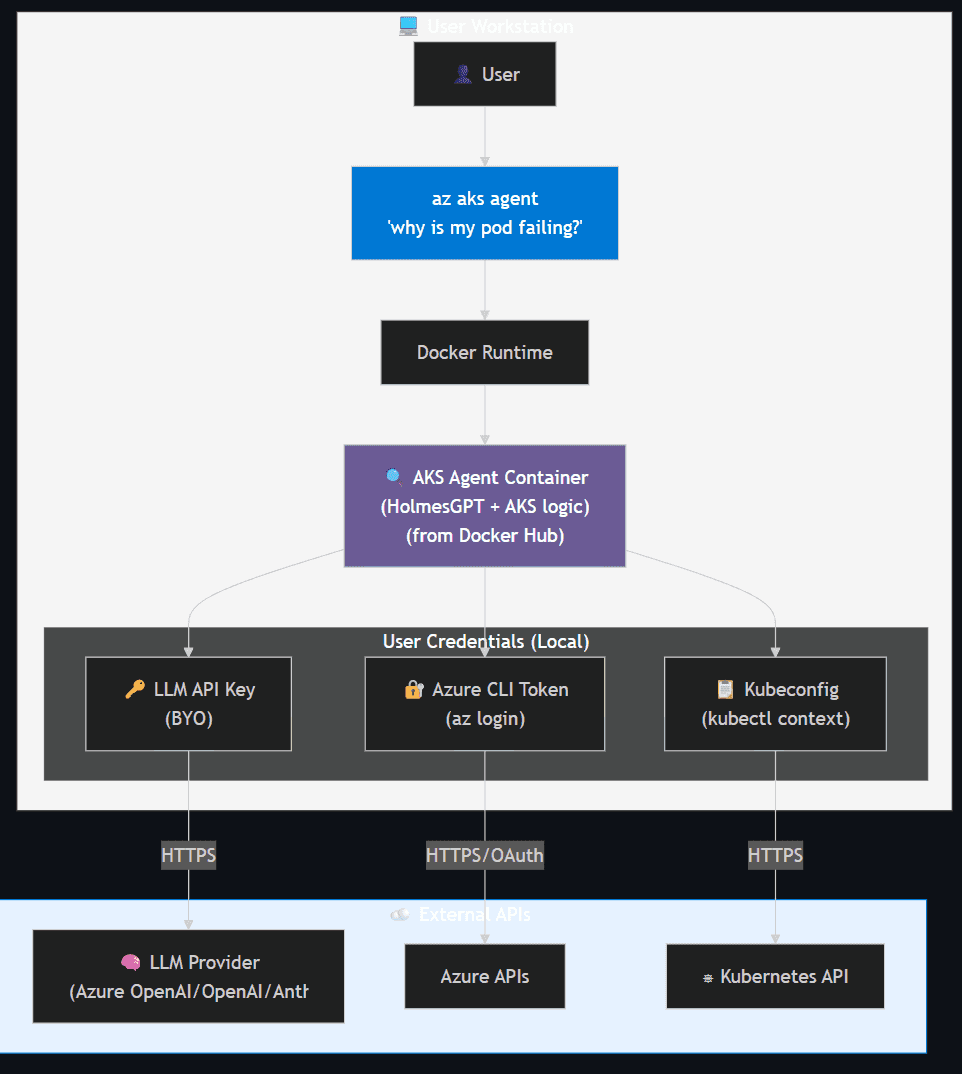
Key Points:
| Aspect | Details |
|---|---|
| Image Source | Docker Hub (AKS Agent: HolmesGPT with AKS-specific enhancements) |
| Permissions | Inherits user's Azure RBAC and Kubernetes RBAC |
| Data Privacy | All diagnostics local; data sent only to user's LLM |
| AI Models | BYO — users configure their own provider (no Microsoft retention) |
| Deployment | No cluster setup required — fast and flexible |
🔐 Security Best Practices:
- Uses Azure CLI auth (inherits Azure identity and RBAC)
- Ensure proper RBAC permissions before use
- Use Microsoft Entra integration for authentication
- Audit command usage through Azure activity logs
Cluster Mode
Runs as a pod inside the AKS cluster with explicitly scoped Kubernetes RBAC permissions.
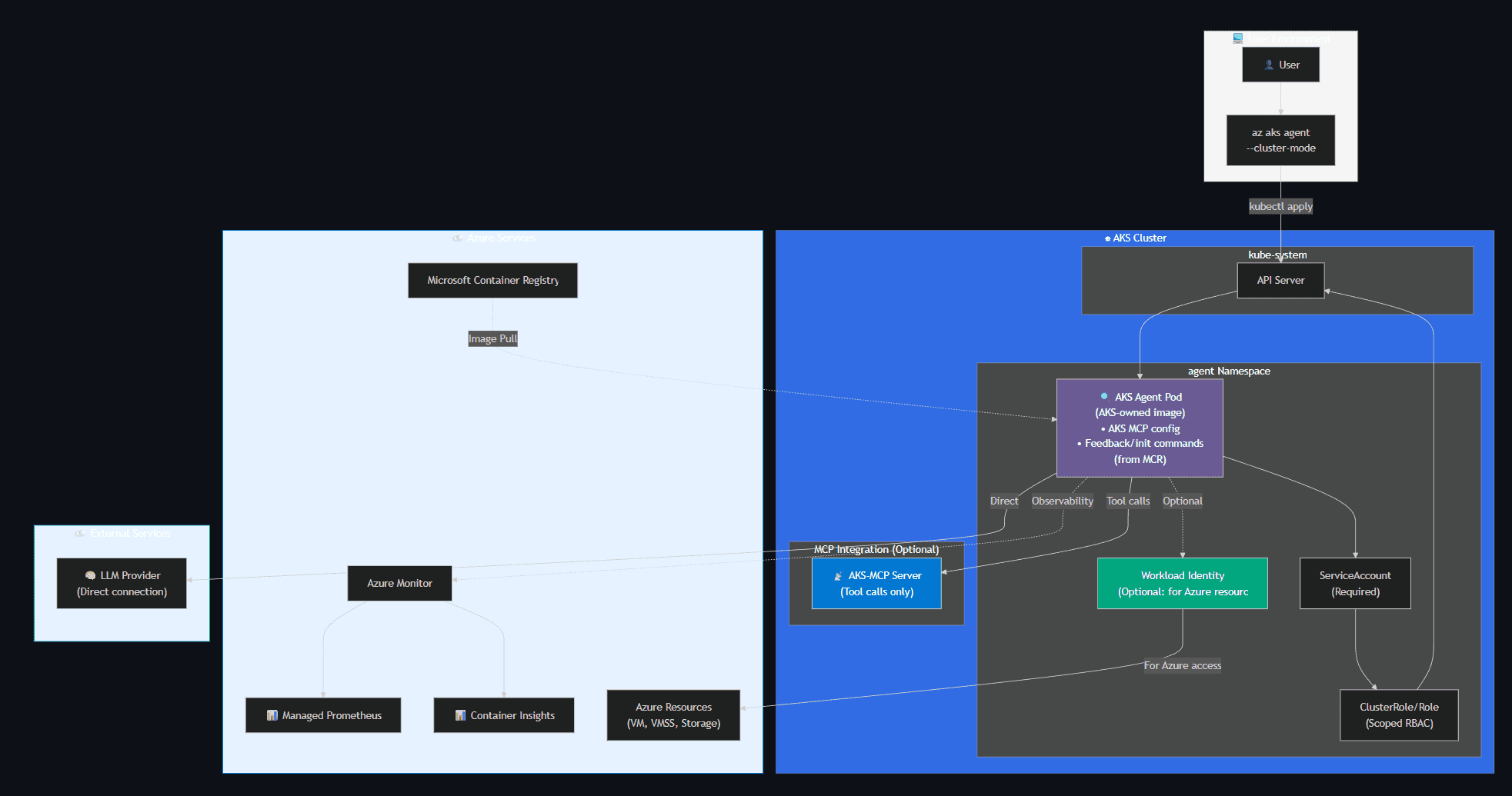
Key Points:
| Aspect | Details |
|---|---|
| Image Source | Microsoft Container Registry (AKS-owned image with unique features: AKS MCP configuration, feedback command, init command) |
| Permissions | ServiceAccount (required) for Kubernetes in-cluster access; Workload Identity (optional) for Azure resources |
| LLM Connection | Agent pod connects directly to LLM provider |
| MCP Role | AKS-MCP provides tool calls only (not a proxy to LLM) |
| Observability | External Azure Monitor (Managed Prometheus + Container Insights) |
| Azure Access | Workload Identity enables access to base compute (VM, VMSS) and storage |
🌐 Networking Considerations:
- Pod connects directly to LLM provider endpoint (not through AKS-MCP)
- ServiceAccount required for in-cluster Kubernetes API access
- Workload Identity optional but necessary for Azure resource access (VM, VMSS, storage)
- Observability data sent to Azure Monitor (Managed Prometheus, Container Insights)
- Optional: Network policies to restrict pod communication
Azure SRE Agent
Azure SRE Agent (preview) is a fully managed, AI-powered service in the Azure portal that continuously monitors your Azure resources, automatically investigates incidents, and can take remediation actions with your approval.
📚 Resources: Azure SRE Agent – Create and use | App Service tutorial | Container Apps tutorial
What it does:
- Receives alerts from Azure Monitor, PagerDuty, or ServiceNow
- Automatically collects and analyzes logs, health probes, metrics, and telemetry
- Determines if an alert is a false positive, summarizes findings, and identifies root cause
- Suggests remediation steps — or, with your explicit approval, executes them (e.g., rolling back a slot swap, scaling a resource)
- Learns from past sessions via a built-in memory system (session insights, investigation quality scoring)
Key differentiators from the other tools:
| Aspect | Azure SRE Agent | HolmesGPT / Agentic CLI / MCP Servers |
|---|---|---|
| Interface | Azure portal chat | CLI, IDE (VS Code, Claude Desktop, Cursor) |
| Hosting | Fully managed by Azure | Self-hosted (local or in-cluster) |
| Scope | Azure resources (App Service, Container Apps, Cosmos DB, etc.) | Kubernetes-focused (AKS, any K8s) + Azure via MCP |
| Remediation | Can execute approved actions automatically | Read-only by default; write requires explicit opt-in |
| Incident integration | Native Azure Monitor, PagerDuty, ServiceNow | Alert-driven via webhook or manual prompt |
| Memory / learning | Session insights with quality scoring | Stateless per invocation (unless you persist externally) |
Azure SRE Agent is best suited for teams that want a portal-first, always-on monitoring experience across multiple Azure services — while HolmesGPT and the Agentic CLI shine for deep, developer-driven Kubernetes troubleshooting with full control over the agent runtime and LLM provider.
When to Use What?
| Scenario | Recommended Tool(s) |
|---|---|
| Managing Azure resources (Storage, Cosmos DB, App Config, etc.) | Azure MCP Server |
| AKS cluster operations and workload management | AKS MCP Server |
| Real-time network/process/file observability on AKS | AKS MCP Server + Inspektor Gadget |
| Deep root cause analysis with multi-source correlation | HolmesGPT + AKS MCP Server |
| Quick terminal-based AKS troubleshooting | Agentic CLI for AKS |
| Portal-based, always-on monitoring with automated remediation | Azure SRE Agent |
| Incident response across Azure services (App Service, Container Apps, Cosmos DB) | Azure SRE Agent |
| Multi-cloud or custom observability stack (Datadog, NewRelic, Loki) | HolmesGPT |
Integration Patterns
| Pattern | Components | Description |
|---|---|---|
| IDE-centric | VS Code + GitHub Copilot + AKS MCP Server | Interactive development & troubleshooting |
| CLI-centric | az aks agent (Agentic CLI for AKS) |
Quick terminal-based diagnostics |
| Full Observability | AKS MCP Server + Inspektor Gadget | Real-time eBPF tracing with AI |
| Enterprise RCA | HolmesGPT + AKS MCP Server + Prometheus | Comprehensive root cause analysis |
| Portal-first ops | Azure SRE Agent + Azure Monitor | Always-on monitoring with auto-remediation for Azure services |
| Multi-cloud | HolmesGPT + multiple MCP servers | Cross-platform troubleshooting |
References
| Resource | Link |
|---|---|
| Azure MCP Server – Overview | Microsoft Learn |
| Azure MCP Server – Tools | Microsoft Learn |
| AKS MCP Server | Landing Page · GitHub |
| AKS MCP Server Announcement | AKS Blog |
| Real-Time Observability in AKS MCP Server | AKS Blog |
| HolmesGPT | Website · GitHub |
| HolmesGPT CNCF Announcement | CNCF Blog |
| Agentic CLI for AKS – Overview | Microsoft Learn |
| Agentic CLI for AKS Announcement | AKS Blog · Tech Community |
| Azure SRE Agent – Create and Use | Microsoft Learn |
| Azure SRE Agent – Incident Management | Microsoft Learn |
| Azure SRE Agent – App Service Tutorial | Microsoft Learn |
| Azure SRE Agent – Container Apps Tutorial | Microsoft Learn |
| Azure SRE Agent – Cosmos DB | Microsoft Learn |