Problem Statement
For over a decade, organizations have built internal platforms by stitching together CI/CD pipelines, infrastructure-as-code templates, container orchestrators, and bespoke automation scripts — often with each team rolling its own toolchain. The result is familiar: isolated silos, "ticket ops" bottlenecks where developers wait days for infrastructure, fragmented security posture, and a crushing cognitive load on engineers who must understand every layer from Kubernetes networking to cloud IAM. Platform engineering as a discipline emerged precisely to tame this complexity — treating the internal developer platform as a product, paving golden paths, and delivering self-service capabilities so that developers can ship safely without becoming infrastructure experts. Yet just as organizations began to get a handle on that challenge, a new wave arrived.
Over the last year it has felt like AI agents have exploded everywhere: MCP servers and clients, local and remote LLM endpoints, Microsoft Foundry–hosted agents, custom copilots wired into your apps, and more. Every demo looks magical, but when you try to plug these pieces into your real platform, the same questions keep coming back: Where is this agent actually running? Which identity and permissions is it using? How does it reach my clusters, data stores, and SaaS systems? Who – or what – am I really talking to when I type a prompt?
This first post is for platform and application teams who want to embrace agents without turning their environment into an opaque tangle of services. We'll reframe the problem, introduce a mental model for modern AI-powered platforms on Azure, and set the stage for the rest of the series.
Solution
Before diving into specific services, it helps to separate two complementary ideas that often get conflated:
| Platform for Building AI Apps | AI-Powered Platform | |
|---|---|---|
| Focus | Design and host copilots, agents, and AI-driven features | Use AI to operate, observe, and troubleshoot your infrastructure |
| Example | Build a customer-facing agent in Microsoft Foundry | Ask an MCP-connected agent "why is my pod crash-looping?" |
This series addresses both columns. This first post introduces the shared compute and platform building blocks that underpin either approach. Part 2, "Troubleshooting Your Platform the Agentic AI Way", will focus on the second column — walking through detailed architectures with Azure MCP Server, AKS MCP Server, HolmesGPT, and the Agentic CLI for AKS. Subsequent parts will cover platforms for building AI apps and opinionated reference architectures that blend both perspectives. Here we keep things brief and set up the mental model.
Azure compute options for customized platforms
When you design a modern, AI-aware platform on Azure you are usually choosing from a handful of compute runtimes — each with different trade-offs around control, cost, and operational overhead:
| Service | Best for | Infra control | Agent-friendly highlights |
|---|---|---|---|
| AKS Automatic | Teams that want Kubernetes without managing every knob — built-in best practices, auto-upgrades, node auto-provisioning | Medium — opinionated defaults, less to configure | Good fit for hosting MCP servers, agent backends, and traditional microservices side-by-side with minimal cluster ops |
| AKS Standard | Regulated or large-scale environments needing deep networking, GPU node pools, custom admission controllers | High — full control over every layer | Run complex multi-tenant platforms, custom MCP servers, eBPF-based observability (Inspektor Gadget), and heavy agent workloads |
| Azure Container Apps — Consumption | Bursty, event-driven agents and APIs | Low — fully managed | Great for lightweight agent endpoints or webhooks that idle most of the time |
| Azure Container Apps — Dedicated | Steady, long-running agent backends or MCP servers | Medium — reserved capacity | Predictable latency and throughput for always-on agent runtimes |
| Azure Functions — Flex Consumption | Glue logic, orchestration steps, background tasks | Low | Ideal for event-driven extensions to your platform (queue processors, triggers, lightweight orchestration) |
| Hosted Agents in Microsoft Foundry | PaaS-first agent development with managed identity, governance, and Microsoft ecosystem integration | Low | Define agents, tools, and connections without managing infrastructure |
These compute runtimes rarely stand alone. Most platforms also depend on a set of cross-cutting services:
| Service | Role in the platform |
|---|---|
| Azure API Management (APIM) — AI Gateway | Central entry point for LLM and agent traffic — token-rate-limiting, semantic caching, load balancing across model endpoints, usage analytics, and policy-driven governance for AI calls |
| Microsoft Entra ID | Identity backbone — authenticates users, services, agents, and MCP servers; issues OAuth tokens; enforces Conditional Access and RBAC across every layer |
| Azure Monitor (incl. Log Analytics, Managed Prometheus, Container Insights) | Unified observability — metrics, logs, traces, and alerts for clusters, apps, and agent interactions; feeds data to HolmesGPT and other agentic troubleshooting tools |
Key insight: Most real-world platforms are composites — for example, AKS Standard running core microservices with an ACA consumption tier handling bursty agent APIs and Functions wiring everything together through events.
Key components of a modern AI-based platform
Agents, LLMs, and MCP — a quick mental model
Think of it like a body:
Component Analogy Role LLM 🧠 Brain Reasoning, understanding, decision-making Agent 🎯 Coordinator Orchestrates the loop between the user, the LLM, and tools MCP 🗣️ Language / Protocol An open standard that defines how agents discover and call tools MCP Client 👂 Ears The component inside the agent (or IDE) that speaks MCP to a server MCP Server 🔌 Nervous system Receives MCP requests, maps them to real operations, and returns results MCP Tools 💪 Hands & muscles Individual capabilities exposed by an MCP server (Azure APIs, kubectl, queries, etc.)
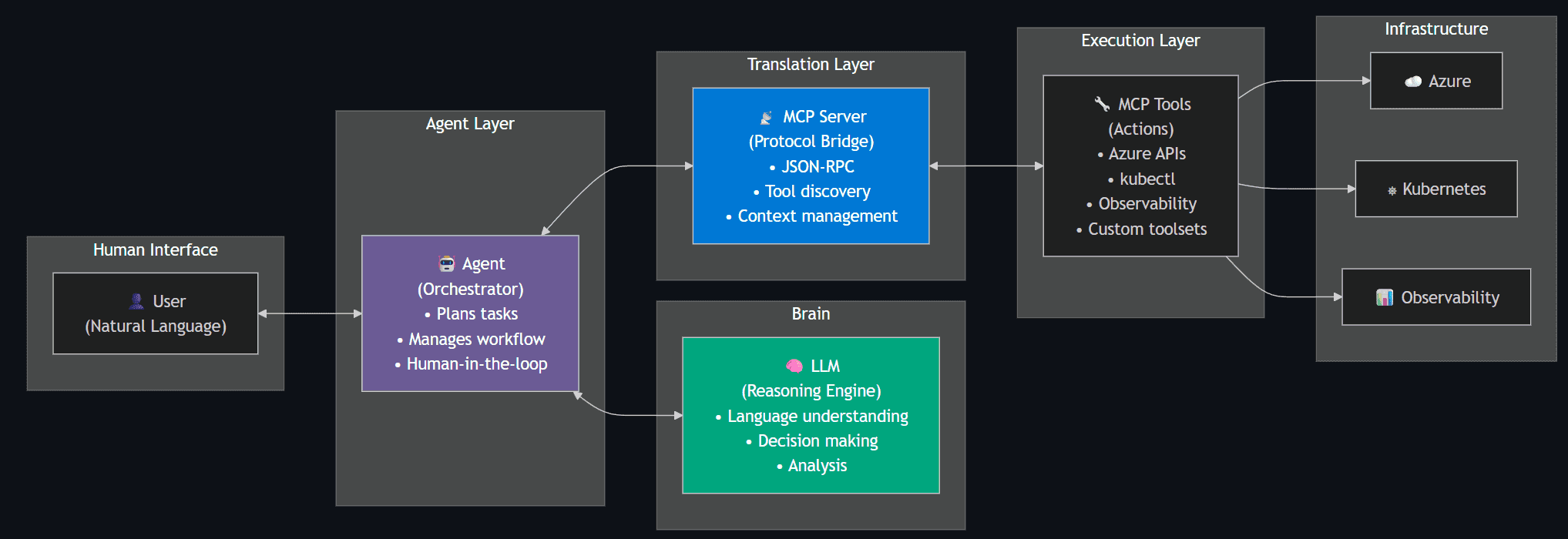
Let's unpack these a bit further:
LLM (Large Language Model) — The reasoning engine behind every agent interaction. When you "talk to AI," you are ultimately sending tokens to an LLM that returns a completion. Examples you'll see across this series:
| LLM | Provider | Typical access path |
|---|---|---|
| GPT-4o / GPT-4.1 | Azure OpenAI Service or OpenAI API | Most common choice when the platform is on Azure |
| o3 / o4-mini (reasoning models) | Azure OpenAI Service or OpenAI API | Multi-step planning and complex troubleshooting |
| Claude (Sonnet / Opus) | Anthropic API | Popular in developer tooling (Cursor, Claude Desktop) |
| Open-source models (Llama, Phi, Mistral) | Self-hosted on AKS (GPU node pools) or Azure AI Model Catalog | Data-sovereignty or cost-sensitive scenarios |
All of the tools discussed in this series (Azure MCP Server, AKS MCP Server, HolmesGPT, Agentic CLI) are BYO-LLM — you point them at whichever model endpoint you prefer.
Agent — The orchestrator that sits between the user and the LLM. An agent decides when to call the LLM, which MCP tools to invoke, and whether to ask the user for confirmation before executing a write operation. Examples: GitHub Copilot in VS Code, HolmesGPT, the AKS Agentic CLI, or a custom agent you build in Microsoft Foundry.
MCP (Model Context Protocol) — An open standard (originally from Anthropic, now widely adopted) that defines a JSON-RPC interface for agents to discover available tools, invoke them with structured parameters, and receive typed results. Think of it as "USB-C for AI tools" — one protocol, many servers.
MCP Client — The piece of software inside an agent or IDE that knows how to speak the MCP protocol. For example, GitHub Copilot in VS Code has a built-in MCP client; Claude Desktop has one; and HolmesGPT includes one that can connect to any MCP server.
MCP Server — A process (local binary or remote container) that implements the MCP protocol, advertises a set of tools, and executes them on behalf of the client. Azure MCP Server and AKS MCP Server are two Microsoft-built MCP servers covered in this series.
MCP Tools — The individual operations an MCP server exposes — for example "list blobs in a storage account", "run kubectl get pods", or "start an Inspektor Gadget DNS trace". Each tool has a typed schema so the LLM knows what parameters to provide.
Azure MCP Server
Microsoft's official MCP implementation covering 40+ Azure services (Storage, Cosmos DB, App Configuration, Monitor, Resource Graph, and more). It can run locally on a developer workstation (using az login credentials and stdio transport) or be deployed remotely on Azure Container Apps with Managed Identity for use by Microsoft Foundry or custom remote agents.
AKS MCP Server
A Kubernetes-specialised MCP server that adds cluster management, workload operations, real-time eBPF observability via Inspektor Gadget, and multi-cluster Fleet management. Like Azure MCP Server, it supports both local and in-cluster (remote) deployment.
HolmesGPT
An open-source, CNCF Sandbox agentic AI framework for root cause analysis. It decides what data to fetch, runs targeted queries against 20+ observability tools (Prometheus, Loki, Datadog, MCP servers, etc.), and iteratively refines its hypothesis. Read-only by design, safe for production.
Agentic CLI for AKS
An Azure CLI extension (az aks agent) powered by the AKS Agent (based on HolmesGPT). It lets you type natural-language questions — "why is my pod failing?" — and get a structured root cause analysis, either from your laptop (client mode) or from a pod inside the cluster (cluster mode).
How these pieces compose into a platform
- The compute substrate (AKS Automatic / Standard, ACA, Functions) hosts your apps, services, and optionally the agents themselves.
- The control surface (Azure MCP Server, AKS MCP Server, platform APIs, events) exposes safe, identity-governed capabilities that agents can call.
- The agent layer (Foundry-hosted or custom-built, backed by HolmesGPT or the Agentic CLI) becomes an intelligent co-pilot for developers and SREs — helping them deploy, observe, and troubleshoot the platform.
What comes next in this series
The goal of this post is to introduce the new terminology — LLMs, agents, MCP, MCP servers, MCP tools — and provide a high-level view of their capabilities and role in platform engineering. By establishing this shared vocabulary, platform teams can better understand how these AI components fit into the broader landscape of building and operating internal developer platforms.
The broader goal of this series is to demonstrate how platform engineering principles — as defined by the CNCF and Microsoft — can be realized on Azure through secure, reliable, and scalable reference implementations. We'll explore how newer platforms like AKS Automatic and Azure Container Apps enable different implementation patterns, incorporate emerging CNCF projects like kro, and show how agentic AI features can eliminate operational toil while maintaining the self-service, governed framework that platform engineering promises.
Part 2, "Troubleshooting Your Platform the Agentic AI Way", will focus on the second column from the table above — walking through detailed architectures with Azure MCP Server, AKS MCP Server, HolmesGPT, and the Agentic CLI for AKS. Subsequent parts will cover platforms for building AI apps and opinionated reference architectures that blend both perspectives.
References
- Microsoft Azure AI Foundry
- Azure MCP Server – Overview
- Azure MCP Server – Tools Reference
- AKS MCP Server | GitHub
- HolmesGPT (CNCF Sandbox)
- Agentic CLI for AKS – Overview
- AKS Blog – MCP Server Announcement
- AKS Blog – Agentic CLI
- What is Platform Engineering? – CNCF
- What is Platform Engineering? – Microsoft Learn