Problem Statement
Most teams running real workloads on Kubernetes do not call a single LLM provider. There is an OpenAI key for the customer-facing chat surface, an Anthropic key for a long-context summarizer, a Gemini key for a multimodal experiment, and an Microsoft AI Foundry deployment that compliance has blessed for regulated data. Each provider has its own SDK quirks, its own authentication model, its own rate-limit semantics, and its own way of reporting tokens and errors.
Three problems show up almost immediately as this stack grows:
- Secrets sprawl. Every workload that calls an LLM ends up with provider API keys mounted as environment variables or pulled from a secret store. Rotation is manual, audit trails are weak, and a single leaked key gives an attacker direct billable access to the provider.
- Provider lock-in at the code layer. The choice of model becomes a code change. Swapping
gpt-4.1forclaude-sonnetor routing a fraction of traffic to a cheaper model for evaluation requires touching the application, rebuilding the image, and redeploying. - No common signal. Each SDK emits its own telemetry, if any. Token usage, latency, cost per route, and per-tenant spend live in N different places. Guardrails, content filters, and PII redaction get re-implemented per app.
The Kubernetes ecosystem solved the equivalent problem for HTTP traffic years ago with ingress and service mesh. The same shape of solution applies to LLM traffic.
Solution
A note before you read on — pick the right tool for your team. On Azure, the first option worth evaluating is the AI Gateway capability in Azure API Management — a battle-tested, fully managed PaaS that gives you token rate-limiting, semantic caching, content safety, load-balancing across model deployments, and built-in metrics with zero infrastructure to operate. For most teams, that is the right starting point. This post is for the other group: platform engineers who already own a Kubernetes footprint, want their AI traffic to ride on the same Gateway API, RBAC, observability, and GitOps primitives as the rest of their workloads, and are comfortable taking on more of the operational surface in exchange for that control. If that's you, read on.
agentgateway is an open-source, Kubernetes-native AI gateway that sits between your workloads and any LLM provider. Apps speak plain OpenAI-compatible HTTP to a single in-cluster endpoint. The gateway terminates that call, applies policies, looks up the right credential, and forwards to the actual provider. Switching providers, adding a guardrail, or turning on token-level metrics becomes a config change on the gateway, not a code change in every app.
agentgateway was originally open-sourced by Solo.io and is built in the open with contributions from a broad community, with 300+ contributors across 60+ organizations, including Microsoft, CoreWeave, Red Hat, Adobe, Salesforce, and Amdocs. It has since joined the Agentic AI Foundation (AAIF) as an open gateway for agentic AI infrastructure under the Linux Foundation, reinforcing its position as a vendor-neutral, community-governed building block for production AI traffic.
agentgateway is built on the Kubernetes Gateway API, so the primitives are familiar: Gateway, HTTPRoute, and a provider-specific AgentgatewayBackend CRD. The upstream LLM gateway tutorial walks the whole flow on a local kind cluster, but this post runs it on AKS so the same setup is also the foundation for the passwordless Microsoft AI Foundry case later in the post.
Bring up an AKS cluster ready for agentgateway
The cluster only needs a couple of non-default flags: OIDC issuer and Workload Identity (so the Foundry section later in this post can use a federated Managed Identity), and Azure Monitor managed Prometheus (so the gateway's token and latency metrics flow into an Azure Monitor Workspace without extra agents).
export RG=rg-agentgateway-demo
export CLUSTER=aks-agentgateway-demo
export LOCATION=westus
export AGW_NS=agentgateway-system
export AGW_VERSION=v1.2.1
export AMW_ID=$(az monitor account show -g rg-monitoring -n amw-west --query id -o tsv)

az group create -n "$RG" -l "$LOCATION" -o table

az aks create \
  -g "$RG" -n "$CLUSTER" -l "$LOCATION" \
  --node-count 2 --node-vm-size Standard_D4s_v5 \
  --network-plugin azure --network-plugin-mode overlay --network-dataplane cilium \
  --enable-oidc-issuer \
  --enable-workload-identity \
  --enable-azure-monitor-metrics \
  --azure-monitor-workspace-resource-id "$AMW_ID" \
  --generate-ssh-keys -o table

az aks get-credentials -g "$RG" -n "$CLUSTER" --overwrite-existing
Install the Kubernetes Gateway API CRDs (shipped separately from any controller), then the agentgateway CRDs and controller via Helm:
kubectl apply -f https://github.com/kubernetes-sigs/gateway-api/releases/download/v1.2.1/standard-install.yaml

helm upgrade -i --create-namespace -n "$AGW_NS" \
  --version "$AGW_VERSION" agentgateway-crds \
  oci://cr.agentgateway.dev/charts/agentgateway-crds

helm upgrade -i -n "$AGW_NS" \
  --version "$AGW_VERSION" agentgateway \
  oci://cr.agentgateway.dev/charts/agentgateway

kubectl get gatewayclass agentgateway
# NAME           CONTROLLER                    ACCEPTED
# agentgateway   agentgateway.dev/controller   True
A full walkthrough of the cluster setup, including the optional managed-Prometheus scrape job that captures agentgateway_* series into the Azure Monitor Workspace, is included in the Governance and observability section below.
Provision a Gateway and an LLM backend
Create a Gateway that the agentgateway controller will materialize as a data-plane pod, then attach one provider. The provider flow is the same shape as the upstream tutorial: pick OpenAI, Anthropic, or Gemini, drop the API key into a Kubernetes Secret, declare an AgentgatewayBackend that references the secret, and attach an HTTPRoute that maps a path (for example /openai) to the backend.
kubectl apply -f - <<'EOF'
apiVersion: gateway.networking.k8s.io/v1
kind: Gateway
metadata:
  name: gateway
  namespace: default
spec:
  gatewayClassName: agentgateway
  listeners:
    - name: http
      protocol: HTTP
      port: 80
EOF

kubectl create secret generic openai-api-key \
  --from-literal=api-key=sk-... -n default
Send POST /v1/chat/completions to the gateway service and you get a normal OpenAI-shaped response back, regardless of which provider is actually answering on the other side. The important property is what the application sees: it only ever calls http://gateway.default/v1/chat/completions with an OpenAI-style JSON body. There is no provider-specific client library, no provider-specific auth header, and no provider-specific URL. The gateway translates as needed on the way out.
Architecture: where the gateway sits
The provider abstraction, in one CRD
The provider-specific knobs are isolated in AgentgatewayBackend. A typical OpenAI backend pulls its key from a Secret:
apiVersion: agentgateway.dev/v1alpha1
kind: AgentgatewayBackend
metadata:
  name: openai
  namespace: default
spec:
  ai:
    groups:
      - providers:
          - name: openai
            openai:
              model: gpt-4o-mini
            auth:
              apiKey:
                secretRef:
                  name: openai-api-key
                  key: api-key
Adding Anthropic or Gemini follows the same pattern: a different provider block under providers[], a different secret. The HTTPRoute decides which path goes to which backend, so you can host all of them on the same Gateway without the apps knowing. Multiple groups give you priority-ordered failover, which is how you wire up a cheap-then-expensive fallback or a primary-region-then-secondary-region pattern.
Beyond keys: Microsoft AI Foundry without any application secret
The cleanest demonstration of why a gateway helps is the case where the provider does not want an API key at all. Microsoft AI Foundry supports Microsoft Entra ID authentication, and on AKS the right pattern is Workload Identity Federation: the gateway pod gets a federated token, exchanges it at Entra ID for an access token, and presents that token to Foundry. The application sees none of it.
The rest of this section walks the full setup end to end.
Prerequisites
- AKS cluster from the earlier section, with
--enable-oidc-issuerand--enable-workload-identityset at create time (or added later withaz aks update). - agentgateway ≥
v1.1.0-beta.2(topic 0 installsv1.2.1). Earlier releases only support IMDS-based managed identity for Azure, which does not work for Workload Identity on AKS. - A Foundry account with a deployed model. Step 1 below provisions one if you do not already have it.
1. Provision Foundry resources (skip if you already have a deployment)
agentgateway's azureopenai provider needs three things from Foundry: the endpoint FQDN, a deployment name, and an API version. Create a fresh Foundry account (kind=AIServices, the modern "Foundry resource") in the same RG as the AKS cluster and deploy gpt-4.1 on it.
export RG=rg-agentgateway-demo
export LOC=westus
export FOUNDRY=agw-foundry-9118     # pick your own name if reproducing

# Foundry account (custom-domain is required for AAD/Entra auth)
az cognitiveservices account create \
  -n $FOUNDRY -g $RG -l $LOC \
  --kind AIServices --sku S0 \
  --custom-domain $FOUNDRY \
  --assign-identity --yes

# Inspect the gpt-4* models actually available in this region
az cognitiveservices account list-models -n $FOUNDRY -g $RG \
  --query "[?contains(name,'gpt-4')].{name:name, version:version, sku:skus[0].name}" -o table

# Deploy gpt-4.1
az cognitiveservices account deployment create \
  -n $FOUNDRY -g $RG \
  --deployment-name gpt-4.1 \
  --model-name gpt-4.1 \
  --model-version 2025-04-14 \
  --model-format OpenAI \
  --sku-name Standard --sku-capacity 10

# Capture the values the backend in Step 5 needs
export FOUNDRY_RESOURCE_ID=$(az cognitiveservices account show -n $FOUNDRY -g $RG --query id -o tsv)
export FOUNDRY_OAI_ENDPOINT=$(az cognitiveservices account show -n $FOUNDRY -g $RG \
  --query 'properties.endpoints."OpenAI Language Model Instance API"' -o tsv \
  | sed -E 's#^https?://([^/]+)/?#\1#')
echo "FOUNDRY_RESOURCE_ID=$FOUNDRY_RESOURCE_ID"
echo "FOUNDRY_OAI_ENDPOINT=$FOUNDRY_OAI_ENDPOINT"
2. Create a User-Assigned Managed Identity for agentgateway
export UAMI=agentgateway-foundry-uami

az identity create -g $RG -n $UAMI -l $LOC
export UAMI_CLIENT_ID=$(az identity show -g $RG -n $UAMI --query clientId -o tsv)
export UAMI_PRINCIPAL_ID=$(az identity show -g $RG -n $UAMI --query principalId -o tsv)
You only need clientId (consumed by the projected AZURE_CLIENT_ID env var in Step 5) and principalId (for the role assignment in Step 3). The backend in Step 6 does not reference the UAMI directly. agentgateway picks it up from the workload-identity env vars at runtime.
3. Grant the UAMI access to Foundry
az role assignment create \
  --assignee-object-id $UAMI_PRINCIPAL_ID \
  --assignee-principal-type ServicePrincipal \
  --role "Cognitive Services OpenAI User" \
  --scope $FOUNDRY_RESOURCE_ID
4. Federate the UAMI to the agentgateway ServiceAccount
The Gateway you created earlier provisions a ServiceAccount named gateway in default. Federate the UAMI to that exact subject so the gateway pod can exchange its projected token for an Entra ID access token.
export CLUSTER=aks-agentgateway-demo
export OIDC_ISSUER=$(az aks show -g $RG -n $CLUSTER --query oidcIssuerProfile.issuerUrl -o tsv)

az identity federated-credential create \
  --name agw-fed \
  --identity-name $UAMI \
  --resource-group $RG \
  --issuer $OIDC_ISSUER \
  --subject system:serviceaccount:default:gateway \
  --audience api://AzureADTokenExchange
5. Annotate and label the gateway pod for Workload Identity
Annotate the ServiceAccount with the UAMI client ID, then inject the azure.workload.identity/use: "true" label onto the gateway pod template via AgentgatewayParameters.
kubectl annotate sa -n default gateway \
  azure.workload.identity/client-id=$UAMI_CLIENT_ID --overwrite

kubectl apply -f - <<EOF
apiVersion: agentgateway.dev/v1alpha1
kind: AgentgatewayParameters
metadata:
  name: agentgateway-wi
  namespace: default
spec:
  deployment:
    spec:
      template:
        metadata:
          labels:
            azure.workload.identity/use: "true"
EOF

kubectl patch gateway gateway -n default --type merge -p '{
  "spec":{"infrastructure":{"parametersRef":{
    "group":"agentgateway.dev","kind":"AgentgatewayParameters","name":"agentgateway-wi"}}}}'
6. Define the Foundry AgentgatewayBackend
The real schema lives at spec.ai.groups[].providers[] (one provider per entry; multiple groups give you priority-ordered failover). Do not set policies.auth.azure. Leaving it empty makes agentgateway use its built-in DefaultAzureCredential chain, which on AKS picks WorkloadIdentityCredential because the env vars projected in Step 5 (AZURE_CLIENT_ID, AZURE_TENANT_ID, AZURE_FEDERATED_TOKEN_FILE) are present.
apiVersion: agentgateway.dev/v1alpha1
kind: AgentgatewayBackend
metadata:
  name: foundry
  namespace: default
spec:
  ai:
    groups:
      - providers:
          - name: foundry
            azureopenai:
              endpoint: agw-foundry-9118.openai.azure.com   # FOUNDRY_OAI_ENDPOINT from Step 1
              deploymentName: gpt-4.1
              apiVersion: 2024-10-21
If you instead set policies.auth.azure.managedIdentity, the proxy is forced onto ManagedIdentityCredential, which on AKS means IMDS, and IMDS will not return a token for a UAMI that is not assigned to the node VMSS. Stick with the implicit default.
7. Route /foundry/* to the Foundry backend
Mount Foundry under a /foundry prefix so it can coexist with other LLM routes on the same gateway. URLRewrite strips the prefix before forwarding so Foundry still sees POST /v1/chat/completions.
apiVersion: gateway.networking.k8s.io/v1
kind: HTTPRoute
metadata:
  name: foundry
  namespace: default
spec:
  parentRefs: [{ name: gateway }]
  rules:
    - matches: [{ path: { type: PathPrefix, value: /foundry } }]
      filters:
        - type: URLRewrite
          urlRewrite:
            path: { type: ReplacePrefixMatch, replacePrefixMatch: / }
      backendRefs:
        - group: agentgateway.dev
          kind: AgentgatewayBackend
          name: foundry
8. Test from an app pod (no key required)
kubectl run curl --rm -i --image=alpine/curl --restart=Never --quiet -- sh -c '
apk add --no-cache jq >/dev/null 2>&1
HTTP=$(curl -sS -o /tmp/r.json -w "%{http_code} in %{time_total}s" \
  http://gateway.default/foundry/v1/chat/completions \
  -H "content-type: application/json" \
  -d "{\"messages\":[{\"role\":\"user\",\"content\":\"Say hi in 5 words.\"}]}")
jq "{reply: .choices[0].message.content, model: .model, usage: .usage | {prompt_tokens, completion_tokens, total_tokens}}" /tmp/r.json
echo "HTTP $HTTP"
'
Expected response:
{
  "reply": "Hello, greetings, how are you?",
  "model": "gpt-4.1-2025-04-14",
  "usage": { "prompt_tokens": 14, "completion_tokens": 9, "total_tokens": 23 }
}
HTTP 200 in 0.69s
In the proxy logs you should see the request line tagged gen_ai.provider.name=azure, gen_ai.request.model=gpt-4.1, http.status=200:
kubectl logs -n default -l gateway.networking.k8s.io/gateway-name=gateway --tail=20 \
  | grep -E 'gen_ai|http.status'
A log line like
azure_identity::managed_identity_credential ManagedIdentityCredential will use IMDS managed identityis emitted when the credential chain is built, not when it is used. As long as the HTTP response is 200,WorkloadIdentityCredentialran first and supplied the token. To confirm, raise the log level for one request:POD=$(kubectl get pod -n default -l gateway.networking.k8s.io/gateway-name=gateway -o jsonpath='{.items[0].metadata.name}') kubectl port-forward -n default $POD 15000:15000 & curl -sS -X POST 'http://localhost:15000/logging?level=azure_identity=debug,azure_identity::workload_identity_credential=trace' # ... rerun the curl above ... curl -sS -X POST 'http://localhost:15000/logging?level=info' kubectl logs -n default $POD --since=1m | grep -i 'workload_identity\|azure_identity'You should see the proxy reading
/var/run/secrets/azure/tokens/azure-identity-tokenand exchanging it at the Entra IDtokenendpoint.
The point worth keeping in mind: from the app's perspective, calling Foundry through the gateway looks identical to calling OpenAI through the gateway. Same path shape, same JSON body, same response. Compliance gets to keep its passwordless story, developers get to keep their OpenAI SDK.
Governance and observability you get for free
Once LLM traffic flows through a single gateway, several things become trivial that were previously per-app projects:
- Token and latency metrics. agentgateway exports
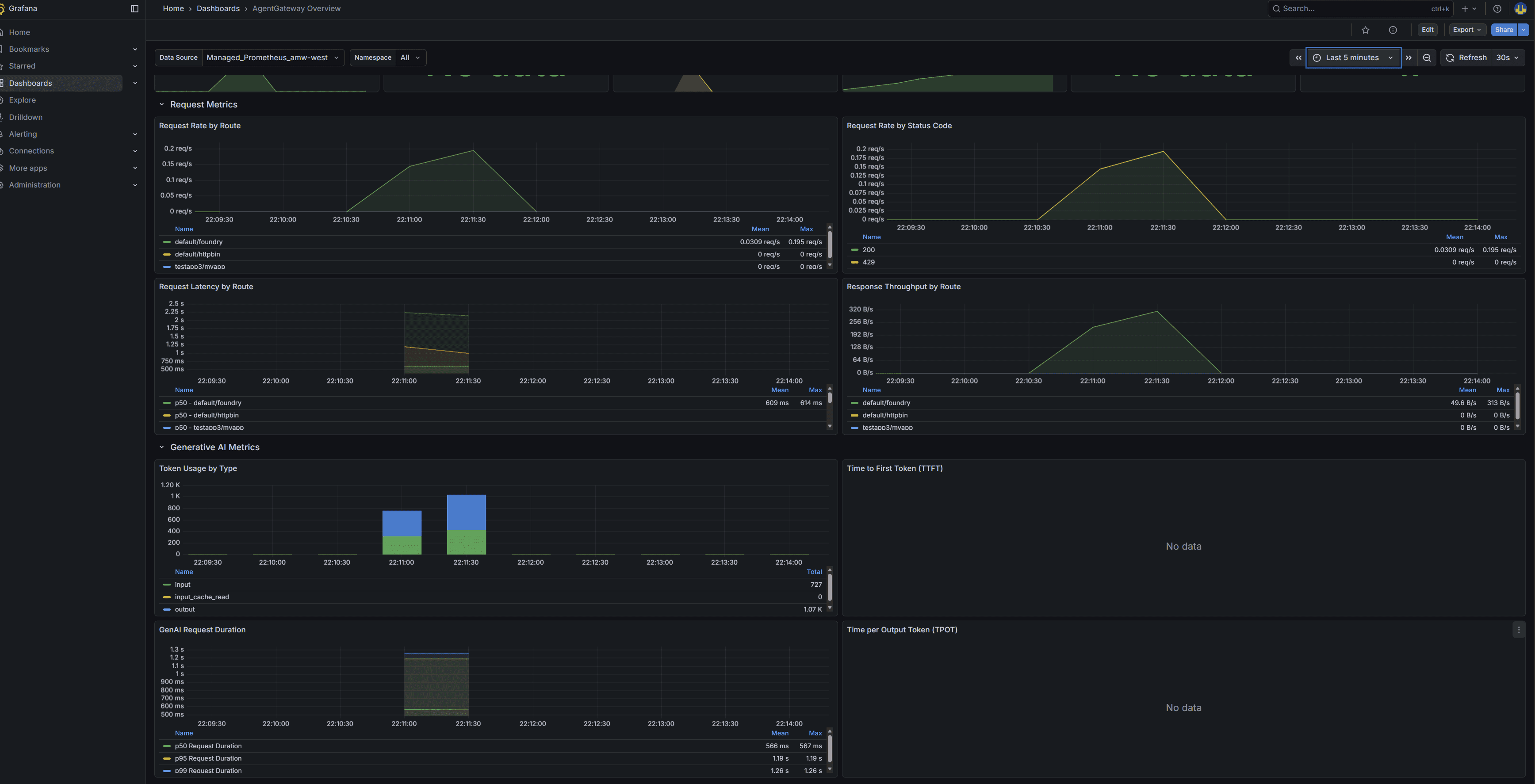
agentgateway_gen_ai_client_token_usage(histogram, labelled byinput/output/input_cache_read) andagentgateway_gen_ai_server_request_durationon:15020/metrics, with dimensions forgen_ai_request_model,gen_ai_response_model,route, andgateway. The community Grafana dashboard (ID 24590) lights up immediately. - Cost attribution. Because the gateway sees every request, you can compute spend per route, per model, or per tenant using the token histograms without instrumenting any application.
- Guardrails. Regex filters, OpenAI moderation, AWS Bedrock Guardrails, Google Model Armor, and custom webhooks are configured on the gateway and apply uniformly across providers.
- Routing and failover. Content-based routing, model aliasing, load balancing, and budget or rate limits are all gateway-level policies.
- Audit and rotation. API keys live in one namespace's
Secretobjects, rotated independently of any application deployment. For Azure, there are no keys at all.
This is the same operational win that an HTTP API gateway gives you, applied to LLM traffic.
Scraping agentgateway metrics into Azure Monitor managed Prometheus
Because the cluster was created with --enable-azure-monitor-metrics, managed Prometheus is already running. Point its scrape config at the gateway pods' :15020 port and the agentgateway_* series land in the Azure Monitor Workspace with no extra agents:
cat <<'EOF' | kubectl apply -f -
apiVersion: v1
kind: ConfigMap
metadata:
  name: ama-metrics-prometheus-config
  namespace: kube-system
data:
  prometheus-config: |-
    scrape_configs:
      - job_name: agentgateway
        kubernetes_sd_configs:
          - role: pod
        relabel_configs:
          - source_labels: [__meta_kubernetes_pod_label_gateway_networking_k8s_io_gateway_name]
            action: keep
            regex: .+
          - source_labels: [__meta_kubernetes_pod_container_port_number]
            action: keep
            regex: "15020"
        metric_relabel_configs:
          - source_labels: [__name__]
            regex: 'agentgateway_.*|envoy_.*'
            action: keep
EOF

# Force ama-metrics to pick up the new config
kubectl rollout restart deployment -n kube-system ama-metrics
Useful PromQL queries against the workspace (run one expression per query, PromQL rejects multiple expressions in a single request):
# Tokens/sec by direction over the last 5 minutes
sum by (gen_ai_token_type) (rate(agentgateway_gen_ai_client_token_usage_sum[5m]))

# p95 LLM request latency per model
histogram_quantile(0.95,
  sum by (gen_ai_response_model, le) (rate(agentgateway_gen_ai_server_request_duration_bucket[5m])))

# Requests/sec to the Foundry route
sum(rate(agentgateway_gen_ai_server_request_duration_count{route="default/foundry"}[5m]))
For a prebuilt dashboard, import community dashboard ID 24590 into Azure Managed Grafana pointed at the same workspace. Most panels light up after the first LLM call; the time-to-first-token and time-per-output-token panels only populate for streaming responses.
Sample Grafana dashboard from a test: